
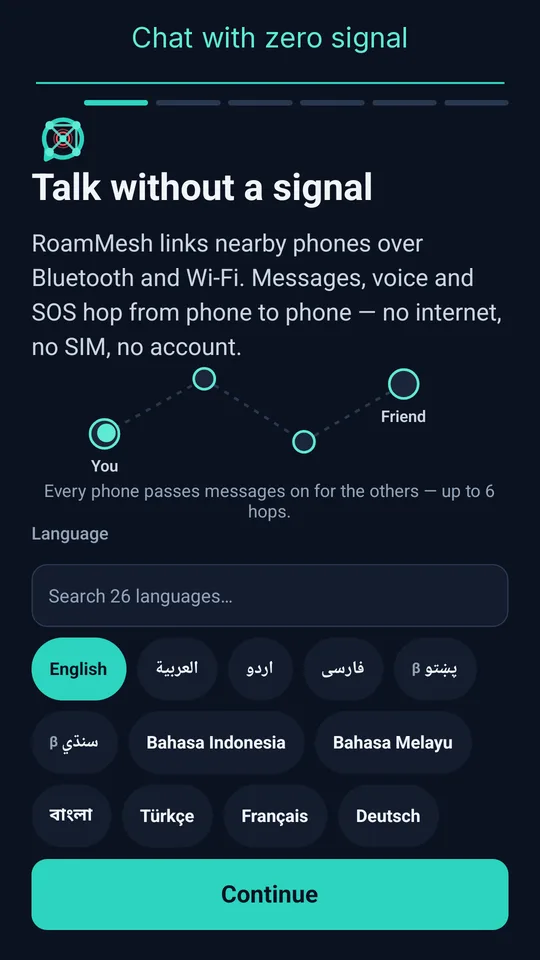
An offline messaging app lets phones talk to each other directly, without a mobile network, Wi-Fi router or internet connection. That matters in exactly the places where you most need to reach your group: a festival field where the network is overloaded, a hiking trail with no coverage, a ship with expensive Wi-Fi, a country where you have no roaming, or a city during a power cut.
This guide explains how offline messaging works, what RoamMesh: Offline Chat & SOS does, how to set it up before a trip, and what its honest limits are. If you want the technical background, read our explainer on how Bluetooth mesh networking works.
What "offline messaging" actually means
Normal messaging apps send every message to a server on the internet, which then delivers it to the other person. When the internet or mobile data is down, nothing moves. An offline messaging app skips the server. Your phone finds other phones nearby using radios it already has, sends the message straight to them, and, if the person you want is further away, other phones running the same app pass it along. That chain of phones is called a mesh.
RoamMesh builds its mesh from three kinds of links on Android:
- Bluetooth Low Energy to discover nearby phones and carry small messages.
- Google Nearby Connections, which uses Bluetooth and Wi-Fi together for faster links between nearby phones.
- Local Wi-Fi (LAN): phones on the same Wi-Fi network or hotspot can talk even if that network has no internet.
Messages can be passed on up to 4 times (4 "hops"), and SOS alerts up to 6 times, so an alert can travel further through a crowd than an ordinary chat message.
What you can do in RoamMesh
Private group and one-to-one chat
Create a group for your family, friends or travel party and chat with no signal. Group and private chats are end-to-end encrypted, so phones that only relay a message cannot read it. Private one-to-one messages are sealed with ChaCha20-Poly1305, a widely used modern encryption method. There is no account and no phone number: you only choose a display name.
Walkie-talkie and voice notes
Hold to talk to your whole group or to one person, like a two-way radio. If someone is out of reach, leave a voice note and it is sent on when a path to them opens up.
SOS with your location
One tap sends an SOS to your whole group with your location (if you allow location) and battery level. The alert keeps repeating until group members confirm they received it, and you can see who confirmed. Incoming SOS alerts always vibrate and sound, even if you have muted other alerts or set quiet hours. RoamMesh never shows ads on SOS screens.
Radar and find your way back
The radar shows roughly how far away and in which direction each group member is. A find-your-way-back compass points to a saved place such as your car, tent or meeting point, with no signal needed. Distances are estimates, especially in dense crowds.
Messages that travel with people
If nobody can reach the other person right now, RoamMesh keeps the message encrypted on the phone and passes it on as people move, a technique called store-and-forward. When a group member reconnects, missed group messages are filled in.
Family features
Kid mode limits children to chatting with people a parent approved, plus SOS, with no public chat, no strangers and no internet bridge. A parent gate protects joining groups and changing settings. Easy mode gives four big buttons, and the app offers 8 accessible themes and 26 languages, including Arabic and Urdu right-to-left.
How to set up RoamMesh before you need it
The single most important step happens before you lose signal: every person in your group needs the app installed and in the same group.
- Install on every phone while you still have internet. Get RoamMesh from Google Play. Offline apps cannot be downloaded offline.
- Open the app and allow access. Choose your language, then allow Bluetooth and Nearby devices access. Location is optional and only needed if you want your position in an SOS.
- Create one group. One person, usually the organiser, taps Create a group on the Chats screen and names it.
- Everyone joins by QR code. The others tap Join with QR code and scan the organiser's code. You can also share an invite link.
- Test together. Turn off mobile data and Wi-Fi internet on one phone and send a text, a walkie-talkie message and a voice note. Check the radar. It takes a couple of minutes and avoids surprises later.
- Agree a meeting point. Save it in the find-your-way-back compass so everyone can walk back to it.
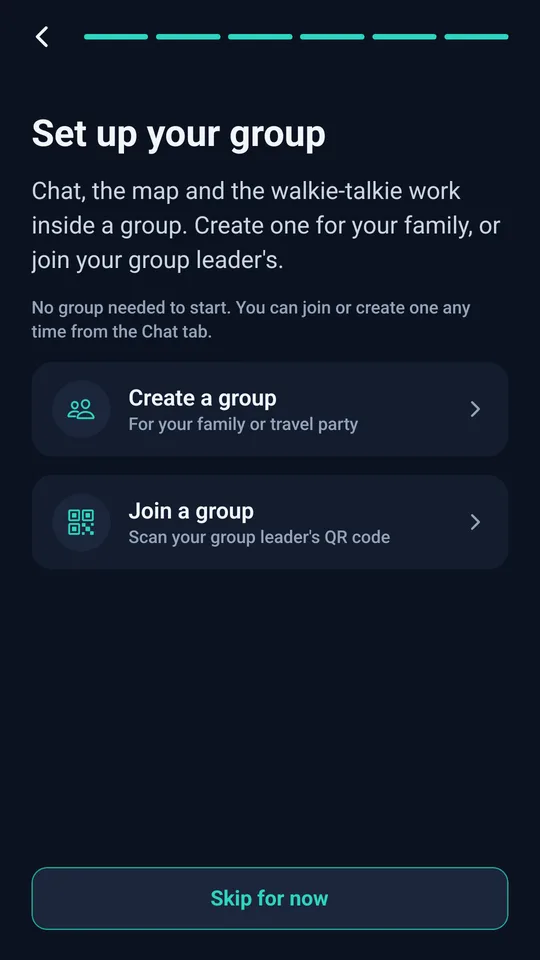
Real RoamMesh screen: set up your group by creating one or joining with the leader's QR code.
Where an offline messaging app helps
- Festivals, concerts and stadiums: tens of thousands of phones in one place can overload the mobile network, but those same phones make a dense mesh.
- Hiking, camping and ski trips: keep a group in touch on trails and slopes with no coverage, as long as people stay reasonably close.
- Flights and cruises: message travel companions elsewhere on the plane or ship without buying Wi-Fi (follow crew instructions on Bluetooth use).
- Travelling abroad: keep your group together without a local SIM or roaming.
- Power cuts and disasters: when networks are down or congested, neighbours with the app can still pass messages.
- Pilgrimages: for Hajj and Umrah there is a sister app built for pilgrims; see our Hajj offline group chat guide. The two apps relay each other's encrypted messages.
The Nearby room (adults only, off by default)
Besides private groups, adults (18+) can switch on Nearby, a public room for people around you. It is public: anyone nearby who has opted in can read it, and the app says so plainly. Messages are short, profanity is masked, and you can long-press a message to block or report. Nearby never uses the internet bridge and is never available in Kid mode or to teens.
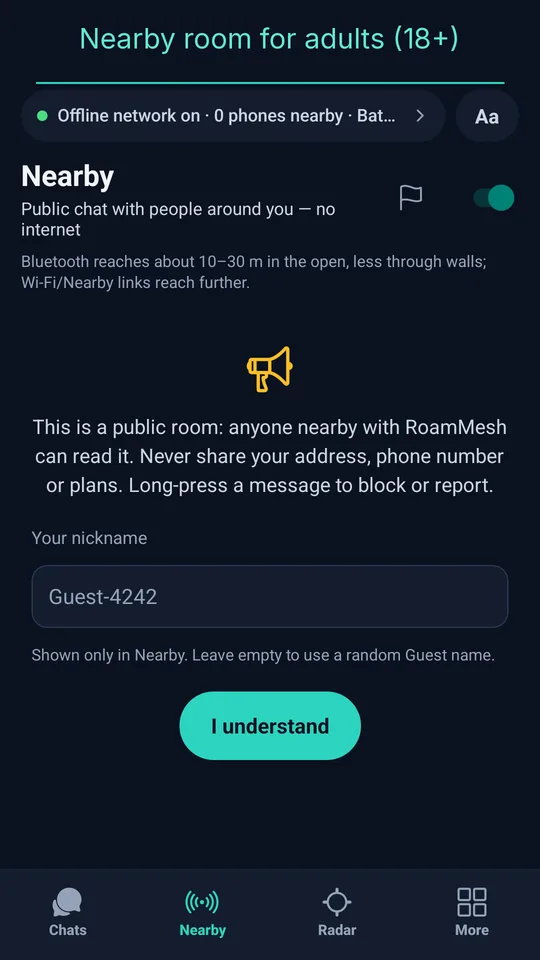
The optional internet bridge
If any phone in your group has data, RoamMesh can optionally use its own encrypted internet bridge to link parts of the group that are far apart. The bridge only relays messages that are already encrypted and deletes them automatically after 24 hours (72 hours for SOS). It is off in Kid mode and never carries the public Nearby room.
Honest limits
Please note: offline messages only reach phones that are in range or connected through other phones running RoamMesh or its sister app. Reach depends on how many phones are nearby, walls, crowds and the phones themselves, so delivery cannot be promised and distances are estimates. RoamMesh is not an emergency service: in a real emergency, call your local emergency number.
Free, with ads you can remove
Every feature in RoamMesh is free. The app is supported by ads, never on SOS or Medical ID screens. You can remove ads with a monthly, yearly or lifetime purchase (prices are shown by Google Play), or watch a short video for 6 ad-free hours, stacking up to 24 hours.
Frequently asked questions
Can I really send messages with no internet and no SIM card?
Yes, to people near you who also have RoamMesh. Phones connect directly over Bluetooth and Wi-Fi and pass messages along, so no mobile network or internet is needed. Messages only reach phones that are in range or connected through other phones running the app.
How far can an offline message travel?
It depends on how many phones running the app are between you and the other person, walls, crowds and the phones themselves. Chat messages can be passed on up to 4 times and SOS alerts up to 6 times. Distances shown in the app are estimates.
Do I need an account or phone number?
No. RoamMesh has no accounts and does not ask for a phone number. You pick a name for your group to see.
Is RoamMesh free?
Yes. Every feature is free. The app shows ads; you can remove them with a monthly, yearly or lifetime purchase, or watch a short video for 6 ad-free hours (up to 24 hours).
Can RoamMesh replace emergency services?
No. It can help your group reach you, but delivery cannot be promised. In an emergency, call your local emergency number.
About RoamMesh
RoamMesh: Offline Chat & SOS is a free Android app from SmartPath Apps for group chat, hold-to-talk walkie-talkie and SOS with no signal, SIM or account. Every feature is free; the only purchase removes ads. It does not replace emergency services.